

Find the best spread combinations
No matter if you are looking for spreads in a single ticker or a list of stocks, NinjaSpread can help you find the best ones quickly. Once you have defined your ideal configuration, you can save it and reuse it later.
Right now you can search for 7 types of spreads: calendar, diagonal, butterfly, backspread, ratio, vertical, and iron condor. There is also a special type of scanner that I call a Target scanner that I will show you later.
Let me highlight some of the unique scanning capabilities and use of the various spread scanner.
- Most people search for calendar spreads to take advantage of the horizontal skew (term structure) of Implied Volatility (IV). This is usually impossible to do automatically on most trading platforms. You have to manually combine the front leg with the back leg to see if there is any IV skew to play for. The calendar scanner can help you find the desired skew in a heartbeat.
- If you are searching earnings calendars, you can look for specific stocks that have earnings in the next coming days with a high horizontal skew or R/R. Check out this article that shows you how to do it.
- I love to trade diagonals, but it was really difficult to manually find the right combinations if I am looking for a specific scenario. Here is an article about an interesting SPX diagonal setup.
- You can look for desired risk-to-reward (R/R) ratios in most spreads. This is especially useful if you don’t know what strike combinations to search for in a butterfly for example but you want to target at least a 500% R/R. The scanner will show you all the combinations that meet R/R and also other criteria set.
- You can specify your desired break-even (BE) ranges. If you don’t know which strike differences to select in specific spreads, but you are looking for a minimum BE range percent move, the scanner will show you all the possible combinations.
- It is very easy to scan for standard or broken wing butterflies if you don’t know what strike differences to select, but specify the delta, R/R, and BE ranges. Or if you have the desired strike combination(s) you can also scan for that as well. Right now you can scan for 1/-2/1, 1/-3/2, 2/-3/1 combination of strike quantities in a butterfly spread.
- In a time spread (calendar, diagonal) you can combine several expiration differences, like 7,14,21,28, etc days between them. You can instruct the scanner to check all the combinations. This is especially useful for products like SPX, and SPY where there are almost daily expirations. So manually trying and testing those expirations to get the desired results are pretty burdensome.
- If you are an iron condor trader it can help you find the right strike combinations based on your minimum R/R and strike difference ranges. If nothing is found, you can enable the alert and the scanner will notify you whenever the condition is met for a particular stock or list of stocks.
Here is an example of a calendar scan result that shows you a list of stocks that will have earnings in the next 5 days and have at least 500% R/R with a front delta of 25-45 (which means defines how far the strike is from ATM) and backwardated IV skew that is the front month’s IV is higher than the back month’s.

If you click on the green icon beside every spread, you can quickly copy and paste the spread to thinkorswim where you can further analyze it or just execute the order if you like it.
By clicking on  icon you can add the specific spread to your watchlist for further analysis or review.
If you click on  icon, you can check out the option risk graph of the current spread.
Risk graphs
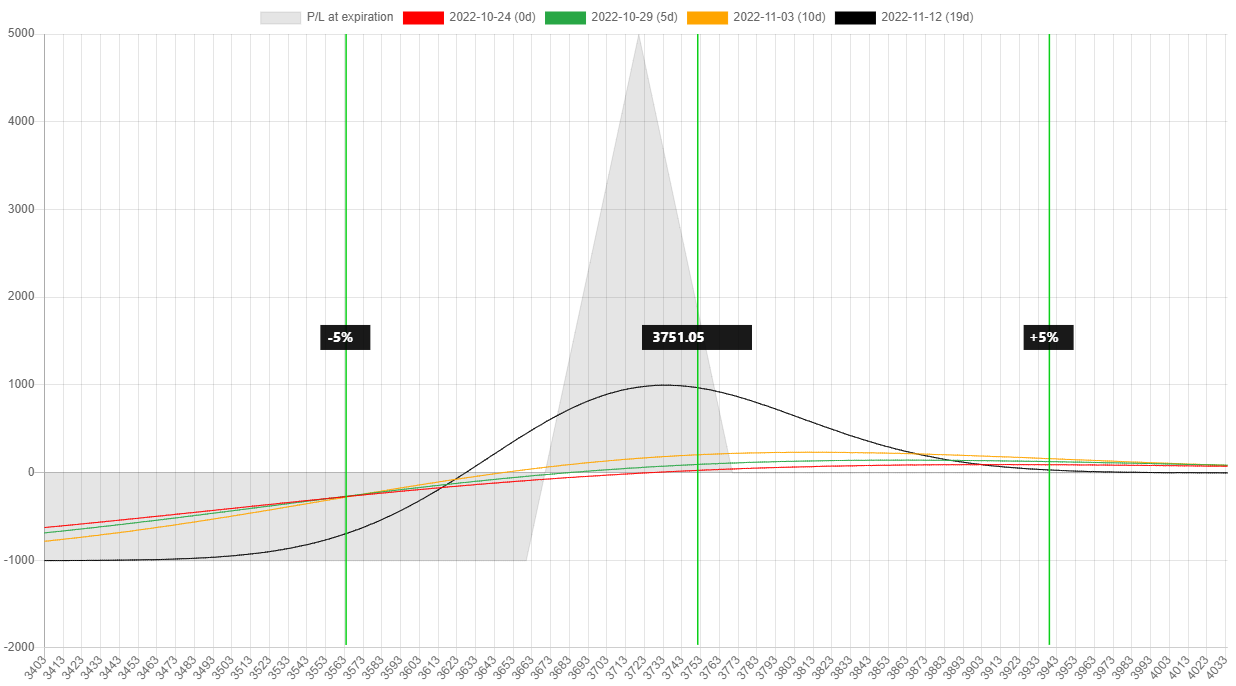
You can check out the risk graph of all the strategies. Here is a sample of a flat (in terms of the delta) broken wing SPX put butterfly.
Target scanner
If you have a target price and expiration in mind for a given stock but you are not sure which spread would be the best choice for that purpose, the Target scanner will show you several options to choose from.
It will compare calendar, diagonal, butterfly, and vertical strategies to each other and you can select the best one for your purpose.
Monitor & alert
The main reason I have developed NinjaSpread is to get notified about specific market setups. In everyday platforms traders can be notified of several things like price, delta, and IV, but not for specific setups.
For example what if I want to be notified about SPX call calendars where there is max. 21 days to expiration, 3 days between legs with a front delta between 20-30 with a min. of 500% R/R, backwardated IV skew, and the debit below $150. Normally this is impossible, right?
With NinjaSpread I can configure this setup in the calendar scanner and click on the alert button and the system will scan the market every 5 minutes and notify me via email if something is found. That way I won’t have to check it manually now and then, but the system will tell me when it is found. Here is a screenshot of how I configured this setup.

What is great about the monitor & alert functionality is that it works on all the spread strategies. If you can define your configuration you can be alerted about it, be it a BWB, a bull call diagonal, etc.
Is it historically cheap or expensive?
I wanted to have a gauge that measures if a specific calendar spread is cheap or expensive relative to historical prices. Searching for SPX, SPY, IWM, and QQQ now I can compare present calendar spread pricing to historical ones since 2019.
The scanner will search for similar calendars in the past and will show you the relative values. So you will have a sense if the current price is overvalued or undervalued. But this unfortunately doesn’t say anything about the future direction of the market.
Send the order to Tradier
NinjaSpread is integrated with Tradier in a way that it doesn’t connect to your Tradier account directly but with a specific link, it will prepopulate the order for you on their web interface. So it will not have any permission to your trading account but will help you quickly create the order and then you can submit it manually on the web trader.
Complete tutorial
For a complete NinjaSpread tutorial, please check out this video. It is marked with chapters, so you can jump around and watch the sections that you find interesting.
What are you looking for?
If you have specific ideas but you are not sure how to define them in NinjaSpread, let me know and I can help you set up those criteria so that later you can reuse them or be alerted about them.
If you sign up for Ninja Spread until 11.30.2022, you get 30 day free trial instead of 14 day and 20% discount. Coupon code: SO10





There are no comments to display.
Join the conversation
You can post now and register later. If you have an account, sign in now to post with your account.
Note: Your post will require moderator approval before it will be visible.